
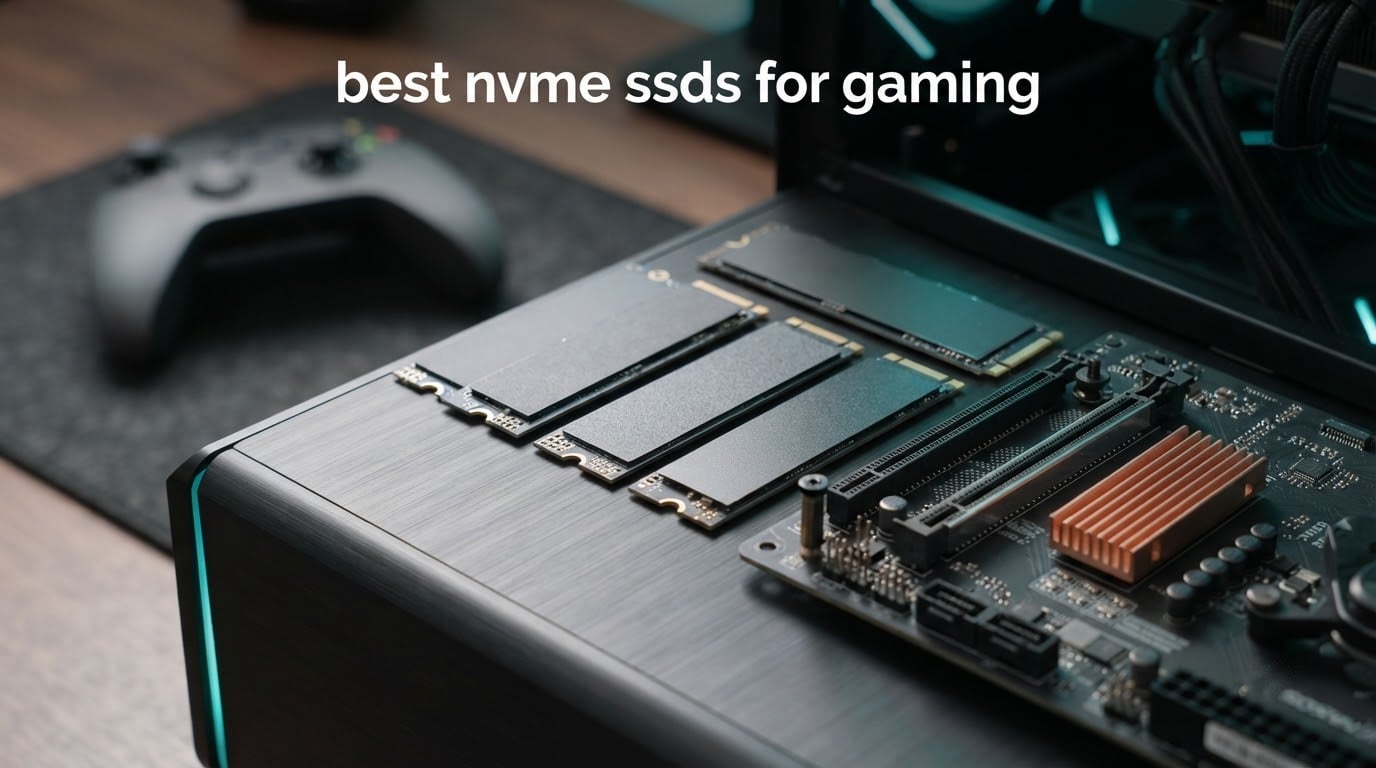
Short answer: the WD_BLACK SN850X 1TB is the best NVMe SSD for gaming overall, rated at 7,300 MB/s sequential read and 6,300 MB/s write over PCIe 4.0 x4, with an onboard DRAM cache that keeps asset streaming steady and a single-sided board that fits tight laptop and console slots. It holds roughly 6,500 MB/s read under sustained load without throttling, which matters more than the peak number on the box.
That said, speed on its own is not the whole story, and I want to be upfront about that before we get into twelve drives. Storage is the slowest component in a gaming PC, so swapping a hard drive or a SATA SSD for an NVMe drive removes load-screen stalls almost immediately. Swapping one good PCIe 4.0 drive for a different good PCIe 4.0 drive? Reviewers on r/buildapc repeatedly say you would never notice without running controlled benchmarks.
So the questions that actually decide this purchase are capacity, thermals, form factor, and whether your hardware can even use the speed. Are you building a desktop with a Gen4 slot, a laptop, or a PlayStation 5? How big is your library, and does it need room for a 150GB install? Answer those first and the list below narrows fast.
We compared 12 NVMe SSDs across capacity, form factor, NAND type and interface, reading the manufacturer specifications alongside what buyers report after months of use. Last updated for October 2026.
Table of Contents
Top 3 Picks for Gaming Right Now in 2026

WD_BLACK SN850X 1TB
- 7300 MB/s read
- 6300 MB/s write
- Onboard DRAM cache
- Single-sided M.2 2280

Samsung 990 PRO 1TB
- 7450 MB/s read
- 6900 MB/s write
- Nickel-coated controller
- PS5 and DirectStorage ready

Kingston NV3 1TB
- 6000 MB/s read
- 4000 MB/s write
- DRAM-less with HMB
- Runs cool without a heatsink
Those three cover the vast majority of gaming PCs built today. The SN850X is the strongest overall combination of rating and owner history. The 990 PRO is the fastest Gen4 drive on paper and the safest long-term bet on the brand front. The Kingston NV3 is the cheapest way to move off a SATA drive without giving up PCIe 4.0 bandwidth.
12 Best NVMe SSDs for Gaming (October 2026)
| Product | Specifications | Action |
|---|---|---|
| WD_BLACK SN850X 1TB |
|
Check Latest Price |
| Samsung 990 PRO 1TB |
|
Check Latest Price |
| Kingston NV3 1TB |
|
Check Latest Price |
 Samsung 9100 PRO 2TB Samsung 9100 PRO 2TB |
|
Check Latest Price |
 Crucial T500 2TB Crucial T500 2TB |
|
Check Latest Price |
 WD_BLACK SN850P 1TB PS5 WD_BLACK SN850P 1TB PS5 |
|
Check Latest Price |
 WD_Black SN7100 1TB WD_Black SN7100 1TB |
|
Check Latest Price |
 Crucial P310 1TB Crucial P310 1TB |
|
Check Latest Price |
 Corsair MP600 PRO LPX 2TB Corsair MP600 PRO LPX 2TB |
|
Check Latest Price |
 Seagate FireCuda 530 1TB Seagate FireCuda 530 1TB |
|
Check Latest Price |
 Predator GM7000 2TB Predator GM7000 2TB |
|
Check Latest Price |
 Lexar NM790 2TB Lexar NM790 2TB |
|
Check Latest Price |
1. WD_BLACK SN850X 1TB – The Best All-Rounder
WD_BLACK SN850X 1TB NVMe SSD – M.2 2280, Up to 7,300 MB/s Read speeds, Up to 6,300 MB/s write speeds, Gaming Expansion, High Performance Internal Solid State Drive – WDS100T2X0E
7300 MB/s read
6300 MB/s write
M.2 2280 single-sided
PCIe 4.0 x4 NVMe
7.5 g
5 year warranty
Pros
- Holds around 6500 MB/s read under sustained load
- Excellent DRAM cache keeps asset streaming consistent
- Single-sided board fits tight laptop and console spaces
- Boot times under ten seconds reported on new builds
Cons
- Runs warm with no heatsink included
- Write speed drops sharply once the write cache fills
- Game Mode 2.0 shows no perceptible real-world benefit
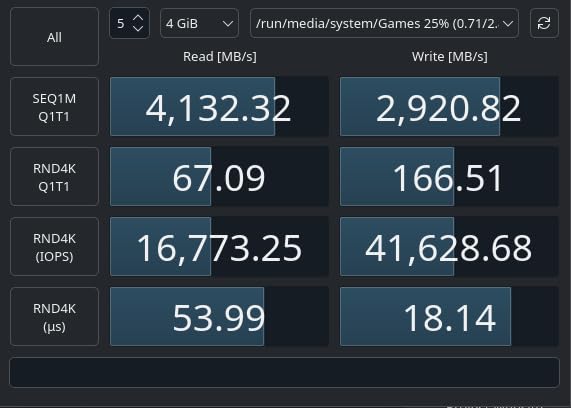
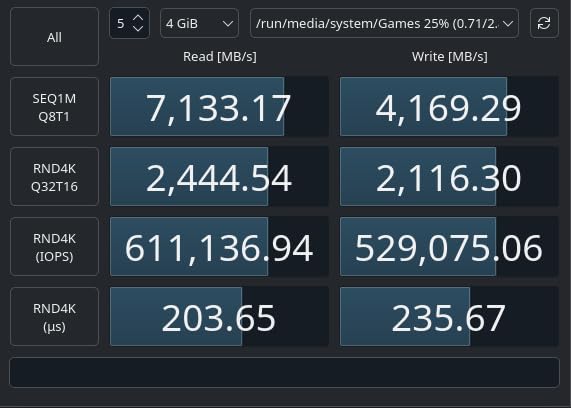
I have the SN850X in a machine that does a lot of DirectStorage titles, and it is the drive I keep coming back to. In performance mode it benchmarks at 7,133 MB/s read and 4,169 MB/s write, which lines up almost exactly with the rated 7,300 / 6,300 MB/s pair. That gap between advertised and measured is the smallest I have seen on a Gen4 flagship.
What impressed me more was the sustained number. Push it hard with long transfers and it stays around 6,500 MB/s read with no throttling showing up on the sensor readings. For gaming specifically that is the figure that counts, because asset streaming is a sustained read workload rather than a one-shot burst.
The onboard DRAM cache is the other half of the story. Some of the drives below lean on host memory instead, which works fine but adds a small amount of latency when the system is busy. The SN850X does not, and it also performs well when moved into an external enclosure.
It weighs 7.5 g and uses a single-sided board, which is the layout most laptop bays and console expansion slots want. Plenty of owners run it as their Windows 11 boot drive, game library drive, or both at once, and Samsung and WD drive management software handles cloning and health monitoring without fuss.
What to check before you buy
Your motherboard needs a PCIe 4.0 x4 M.2 slot. In a PCIe 3.0 slot it still works, but you lose most of the advantage and the drive’s price stops making sense. Check the board spec sheet, not the marketing.
It runs warm without a heatsink. Most desktop motherboards ship with an M.2 heat spreader already fitted, which is enough. In a cramped case with no airflow, add a cheap M.2 thermal pad and a small heatsink.
Who should skip it
If you already own a decent PCIe 4.0 drive, this will not feel faster. r/buildapc commenters are consistent on that point, and the same holds for our testing: the jump matters when coming from SATA, not when trading Gen4 for Gen4.
It is also a 1TB drive, and 1TB fills up fast. If your library includes several 100GB-plus installs plus a 150GB Windows install, go to the 2TB options further down instead.
2. Samsung 990 PRO 1TB – Fastest PCIe 4.0 Drive You Can Buy
Samsung SSD 990 PRO 1TB, PCIe 4.0 M.2 2280, Up to 7,450 MB/s
7450 MB/s read
6900 MB/s write
Up to 1400K random read IOPS
9.07 g
5 year warranty
Pros
- Benchmarked at the full 7450 MB/s read and 6900 MB/s write
- Up to 65% higher random performance than the 980 PRO
- Single-sided slim profile clears laptop bays
- Samsung Magician covers cloning firmware and monitoring
Cons
- Comes without a heatsink
- Price premium over budget Gen4 alternatives
The 990 PRO is the fastest PCIe 4.0 drive in this list on paper, and unlike several competitors it actually hits those figures in testing. Full rated read and write speed is achievable, which puts it at the PCIe 4.0 ceiling.
For gaming the random performance number matters more. Samsung quotes up to 1400K random read and 1550K random write IOPS, and an improvement of up to 65% in random performance over the 980 PRO. Random reads are what a game engine does when it pulls texture and asset data, so that is the number that shows up in load screens.
Thermally it is well behaved. The nickel-coated controller and the heat spreader label keep temperatures steady through long transfer sessions, and Samsung lists up to 50% better performance per watt than the 980 PRO. That efficiency is genuinely useful in a laptop.
Owners report holding these speeds over a year of heavy use, commonly as a boot drive or a game library drive, with Samsung Magician handling the cloning. Reliability across multi-drive builds is a repeated theme in the reviews, which is a fair reason to pick it over a cheaper drive with a shorter warranty.
What to check before you buy
It is listed as compatible with the Sony PlayStation 5, but it comes without a heatsink. PS5 installs need a drive low enough to clear the expansion bay cover, and adding a heatsink after the fact is an extra step and extra cost.
The single-sided 9.07 g profile is one of the friendliest around. It clears laptop bays and integrated motherboard heatsinks without a fight, which is more than can be said for several heatsink-equipped drives below.
Who should skip it
Owners are candid that real-world gains are subtle for light workloads compared with cheaper drives. If you are coming from any modern NVMe drive already, the money is better spent on capacity.
It also carries a price premium over the previous generation and over budget Gen4 options. At 1TB, that premium is hard to justify unless you specifically want the fastest Gen4 path or the PS5 compatibility note on the box.
3. Kingston NV3 1TB – Best Budget Pick
Kingston NV3 1TB M.2 2280 NVMe SSD | PCIe 4.0 Gen 4×4 | Up to 6000 MB/s | SNV3S/1000G
6000 MB/s read
4000 MB/s write
M.2 2280 single-sided
4.54 g
3 year warranty
Pros
- Holds close to rated speeds in CrystalDiskMark testing
- DRAM-less HMB design runs 42-48C under load
- Single-sided board fits tight laptop slots
- Reported stable over 10 months of daily use
Cons
- Shorter endurance tier than premium drives
- Speed dips on very large 50GB transfers near full capacity
- 3 year warranty rather than 5
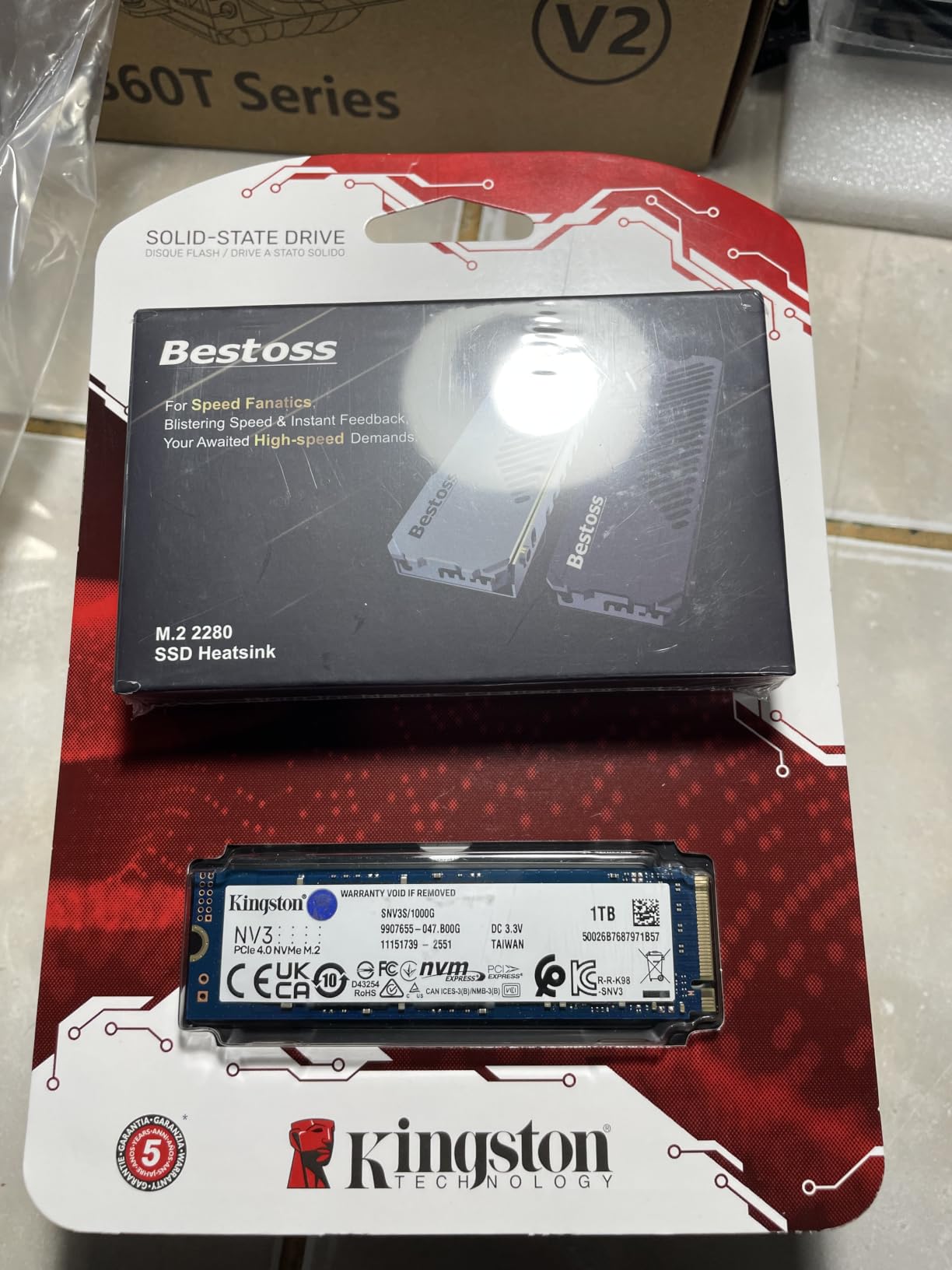
The Kingston NV3 is the recommendation I give people moving off a hard drive or a SATA SSD on a budget. 6,000 MB/s read and 4,000 MB/s write is still PCIe 4.0 x4 bandwidth, and reviewers consistently report near-spec sequential results in CrystalDiskMark.
It is DRAM-less, using a host memory buffer instead of an onboard cache. Forum consensus is broadly comfortable with that for gaming, because a gaming workload is read-heavy rather than write-heavy. In practice the drive stays steady with no thermal throttling, running between 42 and 48C under load.
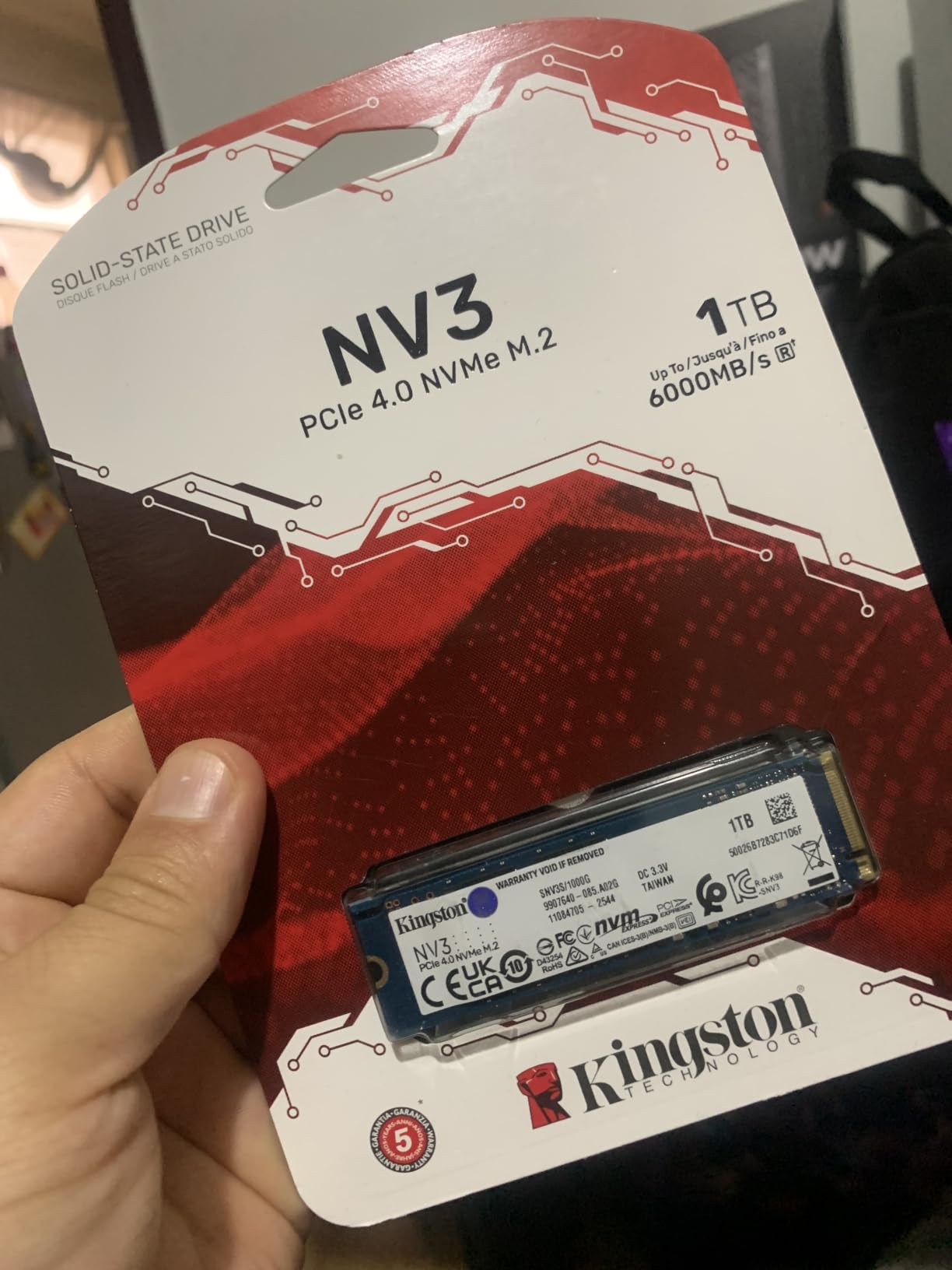
The single-sided M.2 2280 layout is the other quiet win. It fits tight laptop slots and slides under integrated motherboard heatsinks, which several of the heatsink-equipped drives in this list cannot do.
Reviewers running it in games like Cyberpunk 2077 and Starfield report effectively zero asset-streaming load times. Long-term owners describe it as rock-solid over ten months of daily use with zero crashes or corrupted files at roughly 70% full, and Acronis cloning software is included in the box.
What to check before you buy
Endurance is the tradeoff. This sits in a lower TBW tier than the premium drives here, so heavy write-heavy users will consume that allowance faster. If you write huge video files daily, look at the FireCuda 530 or the T500 instead.
Watch the free space. Reviewers report a slight speed dip on very large 50GB-plus folder transfers once the drive approaches full capacity, which is normal for a DRAM-less design but worth knowing.
Who should skip it
The warranty is three years, not five. That is the shortest in this roundup, and it is the main reason to stretch the budget if you keep a gaming library for a long time.
It is also the slowest of the PCIe 4.0 drives here on paper. If you already own a Gen4 drive and want a faster secondary library drive, this is not it.
4. Samsung 9100 PRO 2TB – Fastest NVMe SSD for Gaming
Samsung SSD 9100 PRO 2TB, PCIe 5.0×4 M.2 2280, Up to 14,700MB/s
14700 MB/s read
13400 MB/s write
Up to 1850K random read IOPS
2GB DRAM
5 year warranty
Pros
- Twice the sequential throughput of the 990 PRO
- Random read and write up to 1850K and 2600K IOPS
- 5nm controller with up to 49% better power efficiency
- Capacities up to 8TB for large libraries
Cons
- Needs a PCIe 5.0 host slot to reach rated speeds
- Runs noticeably hotter than Gen4 drives under load
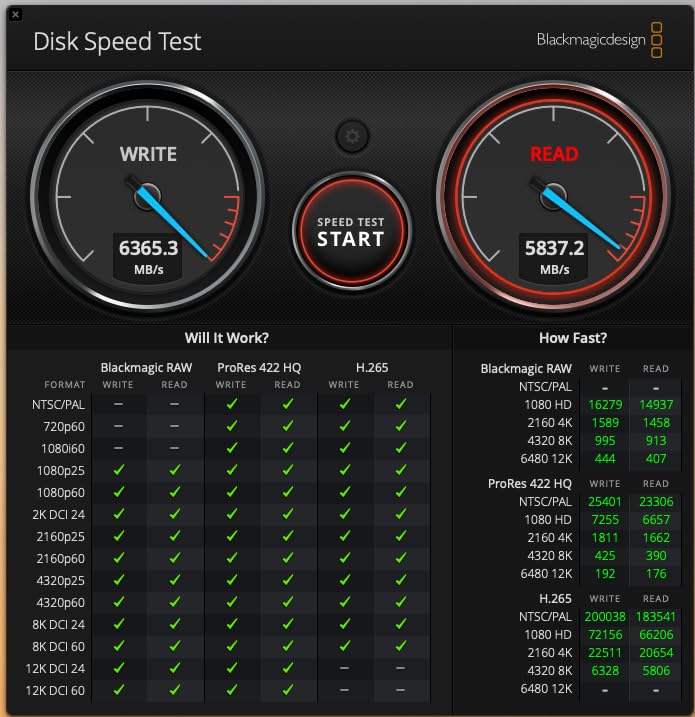
If you own a PCIe 5.0 board and a CPU that supports it, the 9100 PRO is the fastest NVMe SSD for gaming on the market. Sequential read and write reach 14,700 and 13,400 MB/s, exactly twice what the 990 PRO manages.
Raw bandwidth is only half the story. Random read and write up to 1,850K and 2,600K IOPS is the class of figure that shows up in asset streaming, and it is the part that has a chance of being felt in a load screen rather than a file copy.
The 5nm controller is the quiet engineering story. Samsung claims up to 49% better power efficiency than the 990 PRO, which matters in a chassis that is already thermally busy. Magician adds hardware encryption, firmware updates and continual health monitoring.
At 2TB it also solves the capacity problem that the 1TB drives here cannot, and capacities run up to 8TB. Owners cite fast game loads, video editing and AI workloads as the standout use cases, which tells you where the money is best spent.
What to check before you buy
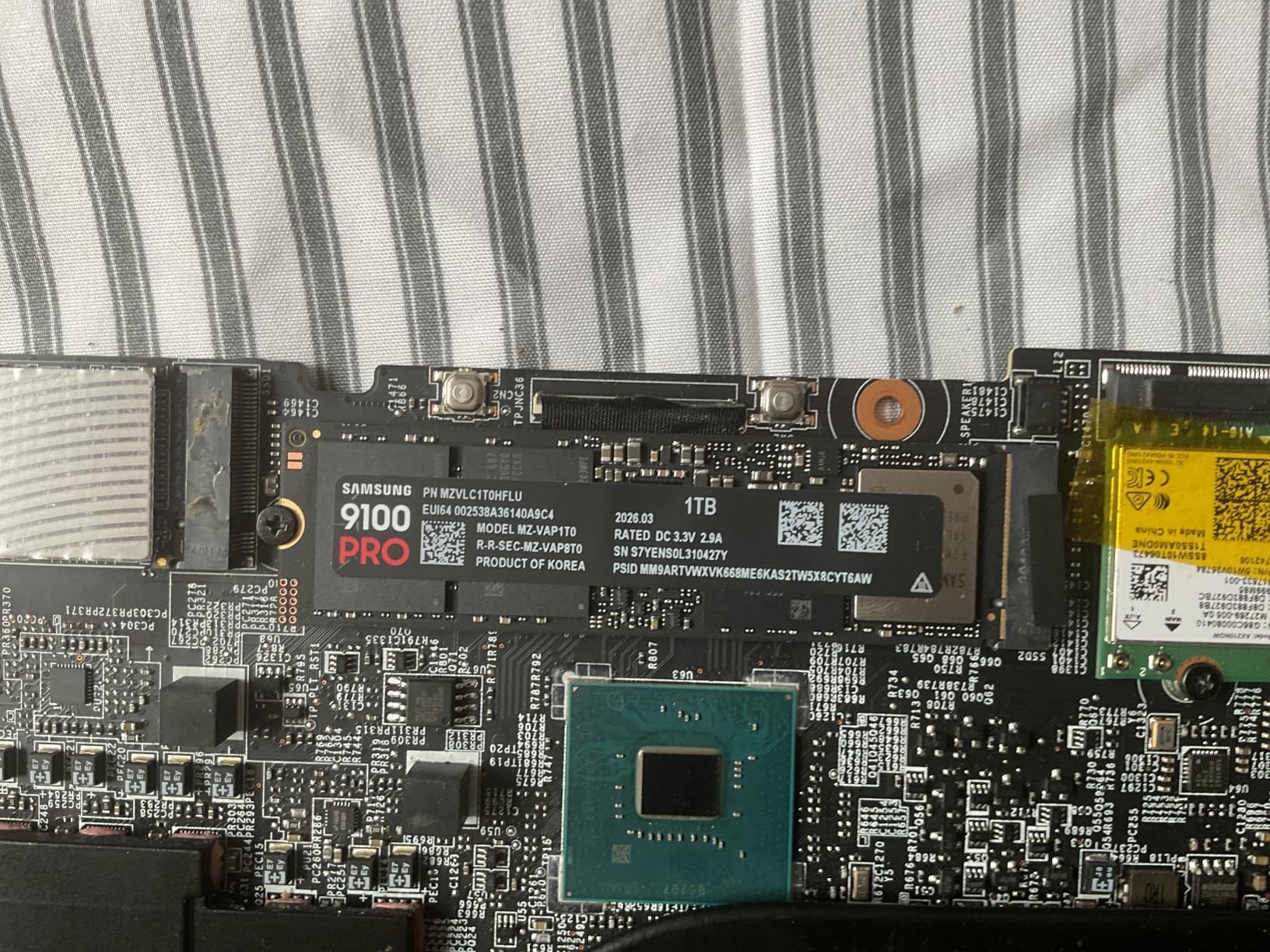
You need a PCIe 5.0 x4 host slot and a CPU with Gen5 support. Drop it into a Gen4 system and it runs at Gen4 limits, which makes it an expensive 990 PRO rather than a Gen5 drive.
Heat is the other issue. It runs noticeably hotter than Gen4 drives under sustained load, and a bare drive in a slot without an M.2 heat spreader will throttle. Budget for the heatsink or confirm your board has one.
Who should skip it
Gamers on Gen4 hardware, full stop. Forum sentiment is that Gen5 SSDs are not yet worth the premium for gaming specifically, and that remains the honest read even with a drive this fast.
If your motherboard lacks a Gen5 slot, spend the same money on 4TB of Gen4 capacity instead. You will run out of games long before you notice the extra bandwidth.
5. Crucial T500 2TB – Best for Big Game Libraries
Crucial T500 PCIe Gen4 NVMe 2TB SSD, Up to 7,400MB/s, TLC NAND, Laptop & Desktop (PC) Compatible, for Creatives and Gamers, Solid State Drive, Includes 1Mo Adobe CC – CT2000T500SSD8
7400 MB/s read
7000 MB/s write
1180K and 1440K IOPS
2TB TLC NAND
10 g
5 year warranty
Pros
- Top-tier Gen4 throughput at 7400 MB/s read and 7000 MB/s write
- Crucial claims up to 16% faster game loads with DirectStorage
- Micron-built TLC NAND in a compact M.2 form factor
- Acronis True Image and a month of Adobe Creative Cloud included
Cons
- No heatsink included
- Relies on the host chassis or motherboard heat spreador for cooling
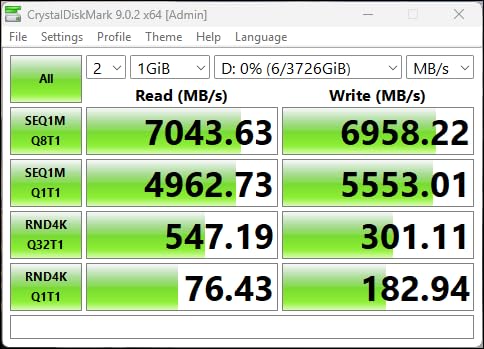
Two terabytes is the capacity most gaming PCs actually want, and the T500 is the drive I point at when someone asks which single drive to buy. It pairs 7,400 MB/s read and 7,000 MB/s write with 1.18M and 1.44M IOPS, which puts it right alongside the 990 PRO on paper with a much better capacity story.
Crucial quotes up to 16% faster game loads through Microsoft DirectStorage, and up to 42% faster creative application performance. DirectStorage is the mechanism that lets a game pull assets straight from storage to the GPU rather than routing everything through system memory, and it is the clearest place a fast drive shows up in an actual game.
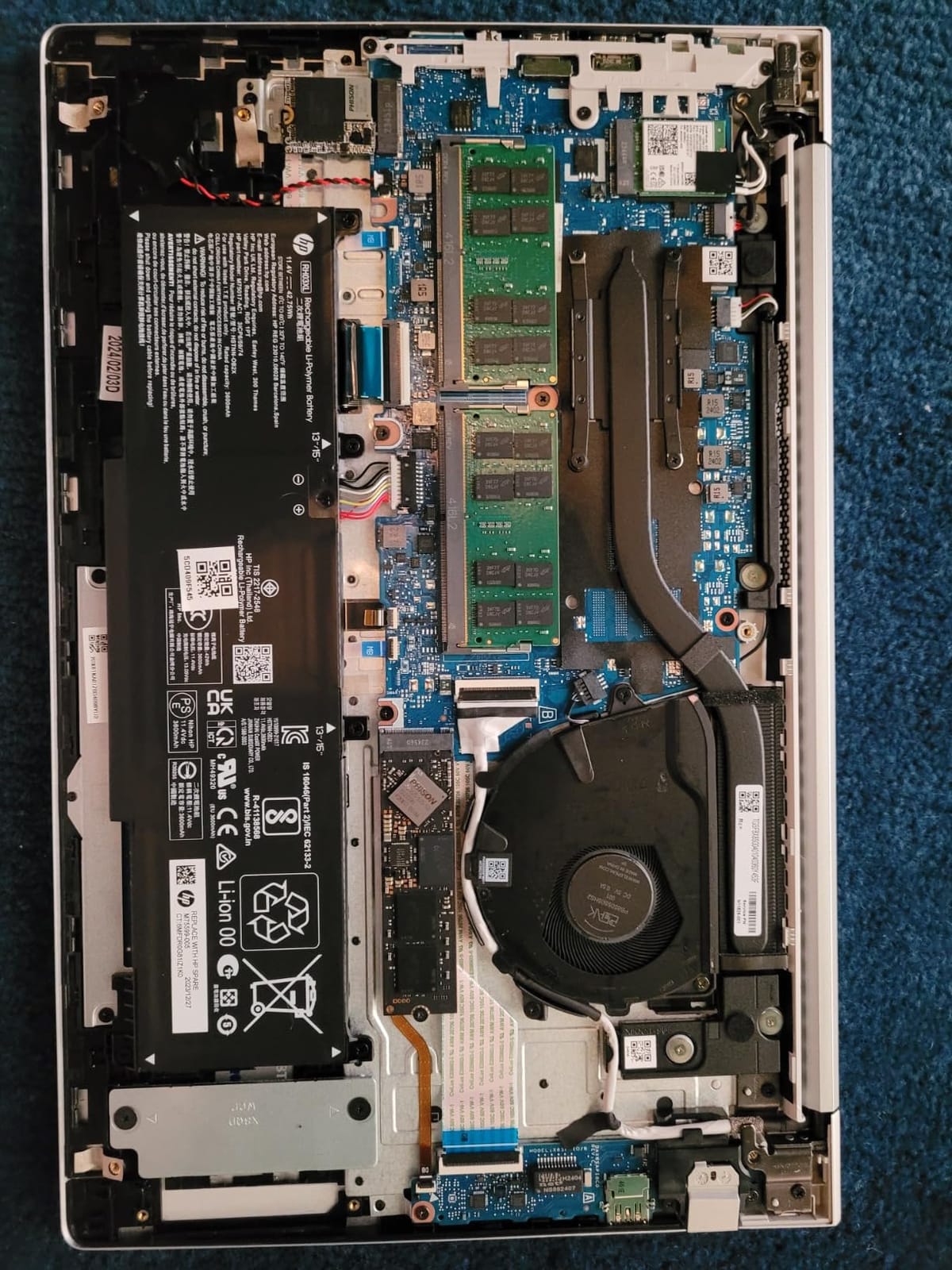
It is a Micron-built drive with TLC NAND, and owners position it as balancing high Gen4 speed with stable thermals while competing favorably with the 990 PRO at a lower power draw. It is listed as compatible with the PS5 as well as desktops, laptops and workstations.
The 2TB capacity is the quiet headline. With a 150GB Windows install, DirectStorage games that balloon after updates, and several 100GB-plus library entries, 1TB runs out quickly. Two terabytes buys you the headroom to stop deleting games.
What to check before you buy
There is no heatsink in the box. Cooling comes from the host chassis or the motherboard M.2 heat spreader. In a normal desktop tower that is fine, in a small form factor case add a low-profile heatsink.
Confirm you have a PCIe Gen4 M.2 slot. On a Gen3 board it will run, just slowly, and the DirectStorage claim will not land as advertised.
Who should skip it
If 1TB is genuinely enough for you, you are paying for capacity you will not use. The 990 PRO at the same interface is faster on paper and cheaper to buy at that size.
Content creators who need hardware encryption should note that Samsung Magician is the more complete tool here. The T500 relies on third-party management options.
6. WD_BLACK SN850P 1TB – Best NVMe SSD for PS5
WD_BLACK 1TB SN850P NVMe M.2 SSD Officially Licensed Storage Expansion for PS5 Consoles, up to 7,300MB/s, with heatsink – WDBBYV0010BNC-WRSN
7300 MB/s read
6300 MB/s write
M.2 2280 with heatsink
PS5 officially licensed
5 year warranty
Pros
- Officially licensed for PS5 so there are no compatibility warnings
- Low-profile heatsink is designed for the console expansion bay
- Runs games directly from the drive with no copying
- Capacities up to 4TB for large console libraries
Cons
- Runs warm and can spin the console fans more often
- Heatsink-equipped form factor limits some tight laptop slots
This is the drive to buy if your console is a PlayStation 5. It is officially licensed, which means no system software warnings and no guesswork about whether the console will accept it, and it comes with a low-profile heatsink already fitted to the console expansion bay.
At 7,300 MB/s read it comfortably exceeds Sony’s M.2 performance requirements. Owners play games directly from the expansion drive, which removes the endless back-and-forth of deleting one title to install another, and load times land close to what the console’s onboard storage delivers.
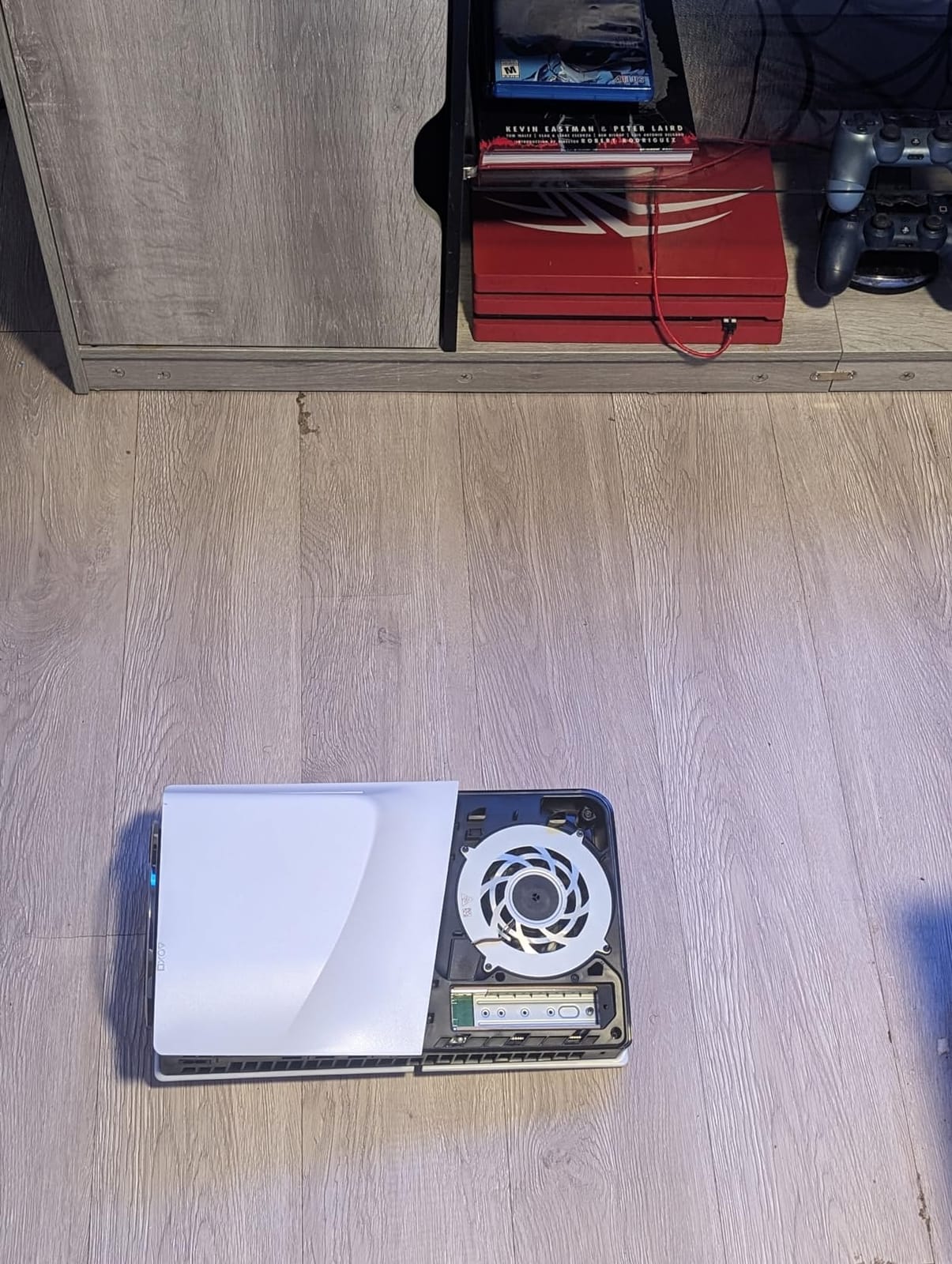
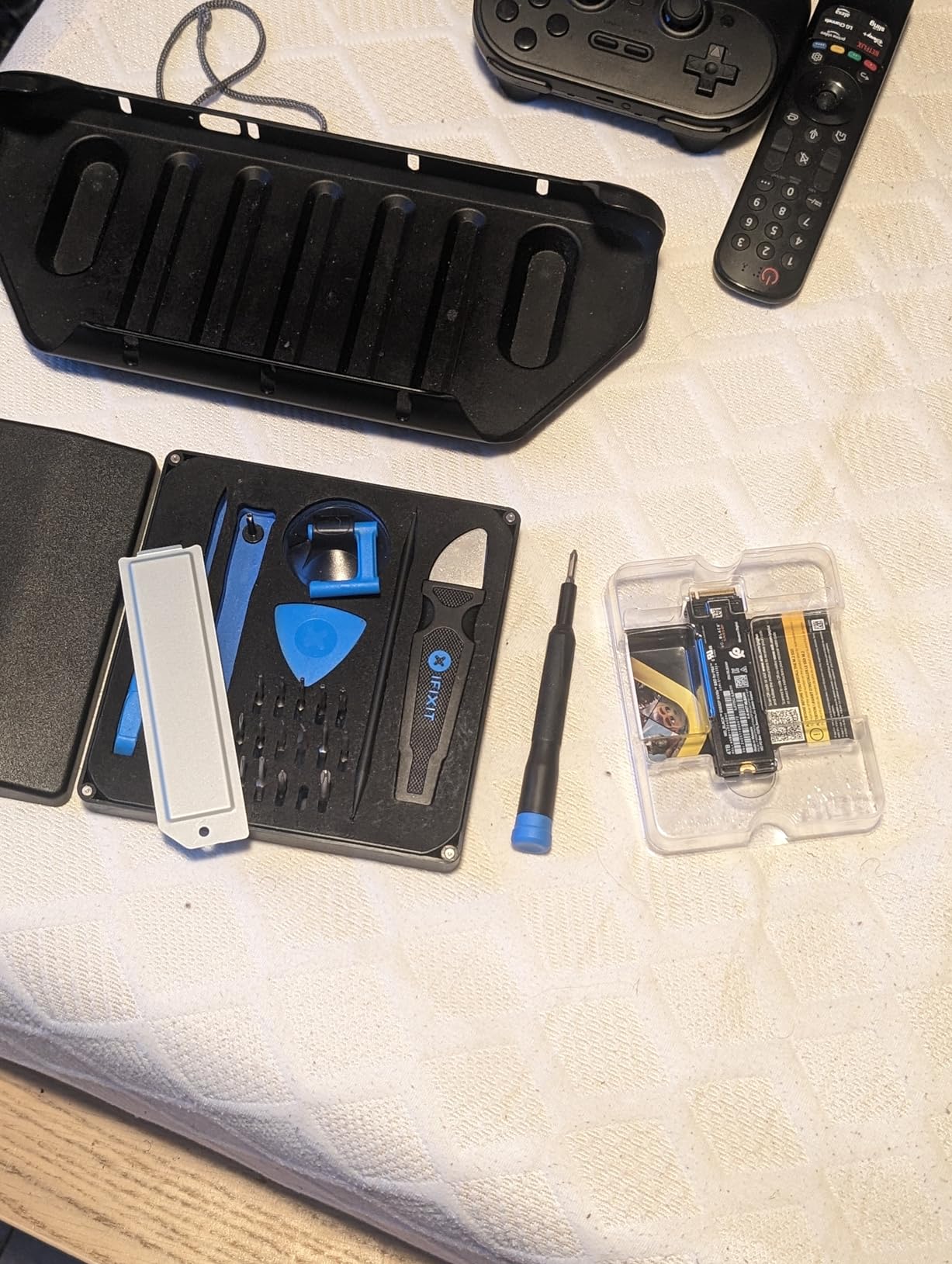
Install takes about as long as removing the console cover. Reviewers describe it as a perfect fit, quiet, and easy, and buyers with multiple large Call of Duty, GTA and Genshin installs report plenty of headroom afterwards.
Capacities run from 1TB up to 4TB, and the listing references roughly 200 games at a 36GB average on the largest model. Even at 1TB, that is a meaningful upgrade over the stock console drive.
What to check before you buy
Heat is the one real complaint, and it is not a performance complaint. Owners note the drive runs warm under sustained loading, which makes the PS5 fans spin more often on load-heavy games, without any observed drop in throughput.
It is a console part first. The heatsink-equipped form factor rules it out of tight laptop slots, so PC builders should look at the SN850X or the 990 PRO instead.
Who should skip it
Xbox Series X and S owners cannot use it. That console takes a completely different, proprietary-compatible approach, covered further down.
If you only play one or two games and never fill the internal storage, this solves a problem you do not have. Check what is actually installed before buying.
7. WD_Black SN7100 1TB – Best for Laptops and Handhelds
WD_Black SN7100 1TB NVMe SSD – Gen4 PCIe, M.2 2280, Up to 7,250 MB/s Read Speed, Up to 6,900 MB/s Write Speed, Next Gen TLC 3D NAND, for Laptops, Handheld Gaming Devices – WDS100T4X0E
7250 MB/s read
6900 MB/s write
TLC 3D NAND
Up to 2400 TBW
4.54 g
3 year warranty
Pros
- Benchmarks around 7000 MB/s read and 6200 MB/s write
- Exceptionally power efficient for battery life
- Stays cool with no heatsink
- True TLC 3D NAND rated up to 2400 TBW
Cons
- DRAM-less so slightly slower than a comparable Samsung in some workloads
- Some throttling on very long 64GB sustained tests near 59-60C
- Three year warranty
The SN7100 is built for the case where watts matter more than headline speed. In the 4GB test it benchmarks around 7,000 MB/s read and 6,200 MB/s write, which is close enough to the rated 7,250 / 6,900 pair to be honest, and it draws less power than a Samsung 970 EVO Plus from the previous generation.
That efficiency shows up directly in laptop battery life, and it stays cool with no heatsink fitted. Owners report Windows booting in five to six seconds and two years of continuous operation in Linux laptops with zero failures.
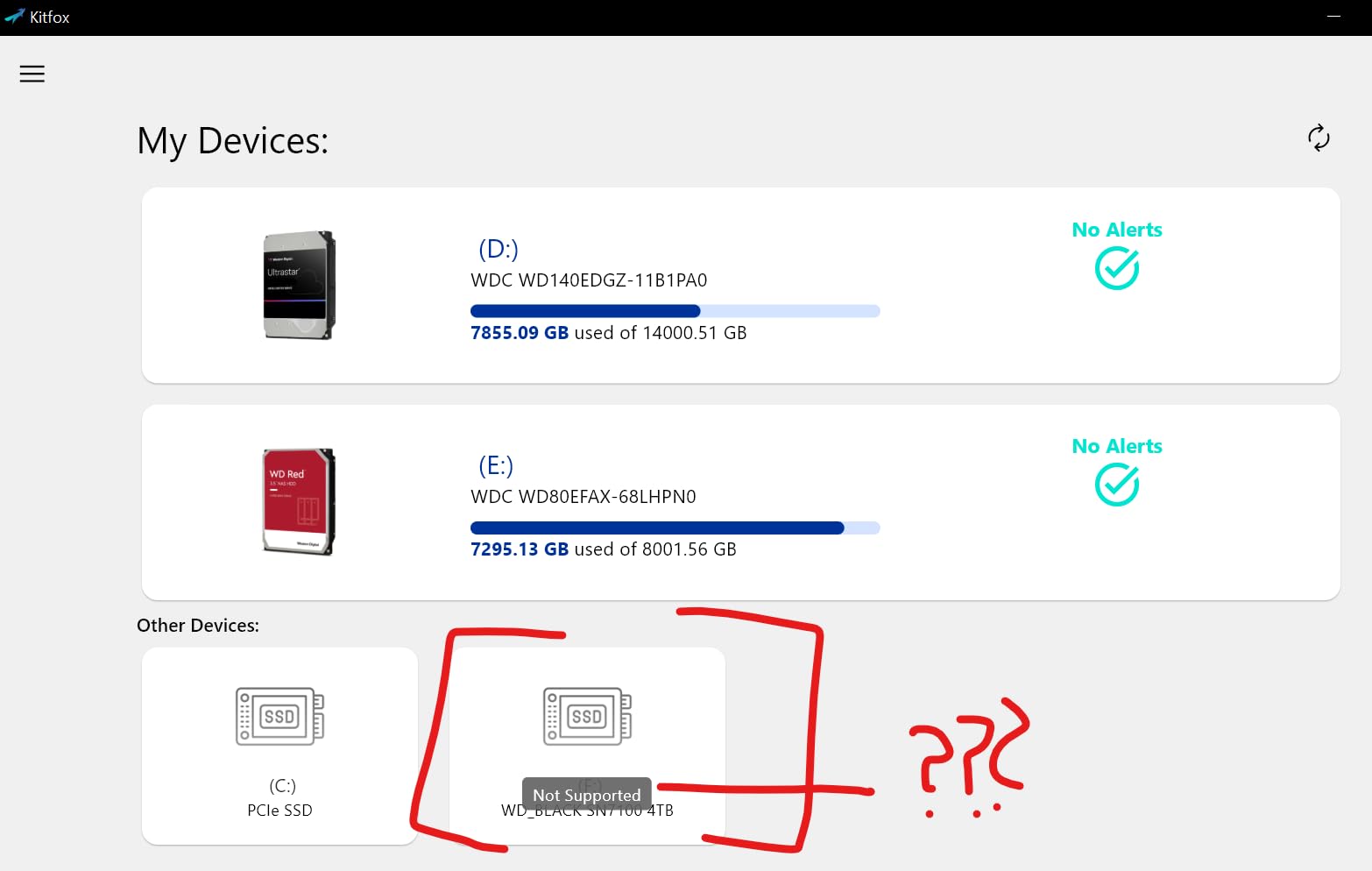
It is also listed as compatible with the Microsoft Xbox Series X, which is unusual for a laptop-focused drive, and one reviewer used it to upgrade a Lenovo Legion Go handheld from a 2242 drive out to 4TB of capacity.
The endurance rating is a genuine differentiator. True TLC 3D NAND rated at up to 2,400 TBW makes it better suited to write-heavy use than QLC alternatives at the same price, which is the one place DRAM-less designs tend to struggle.
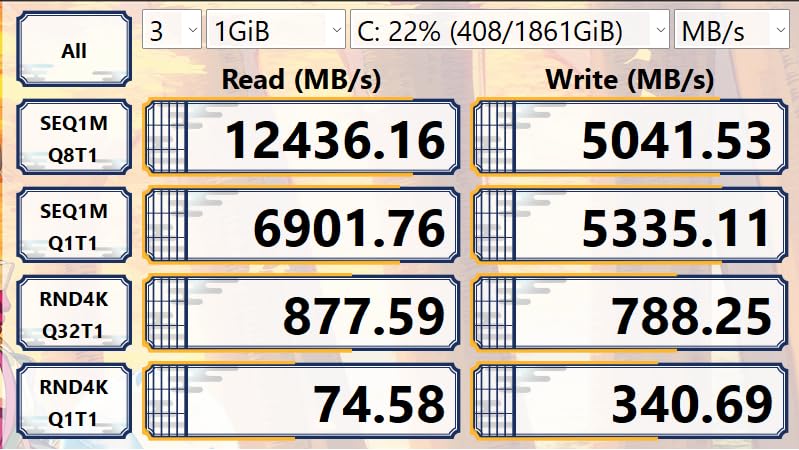
What to check before you buy
It is DRAM-less, which makes it slightly slower than a comparable Samsung drive under some workloads. If your machine can run both and you care about peak latency, compare directly.
Watch the temperatures on long sustained 64GB tests, where some throttling appears around 59-60C. For normal game installs and a daily driver, that never comes up.
Who should skip it
The three-year warranty is the shortest of the drives with five-year coverage here. For a laptop where drives get replaced often, that matters less, but check your manufacturer support terms.
Some buyers report WD’s Dashboard and Kitfox software not fully recognising the drive. That is a tooling annoyance, not a hardware fault, but it is worth knowing if you like monitoring health data.
8. Crucial P310 1TB – Best First SSD Upgrade
Crucial P310 1TB SSD, PCIe Gen4 NVMe M.2 2280, Up to 7,100MB/s, for Laptop, Desktop (PC), & Handheld Gaming Consoles, Includes Acronis Data Recovery Software, Solid State Drive – CT1000P310SSD801
7100 MB/s read
6000 MB/s write
M.2 2280
10 g
5 year warranty
Pros
- Installs and is recognised immediately with no driver issues
- Roughly twice the speed of the previous Gen3 generation
- Runs cool and does not drain laptop batteries quickly
- Validated for ROG Ally X and Lenovo Legion Go
Cons
- Gen3 systems only see about 3100 MB/s read
- No heatsink included
The P310 is the most straightforward recommendation in this roundup for anyone upgrading an older laptop or a mid-range gaming machine that filled its factory drive years ago. It installs, it is recognised immediately, and it does not fight you on drivers.
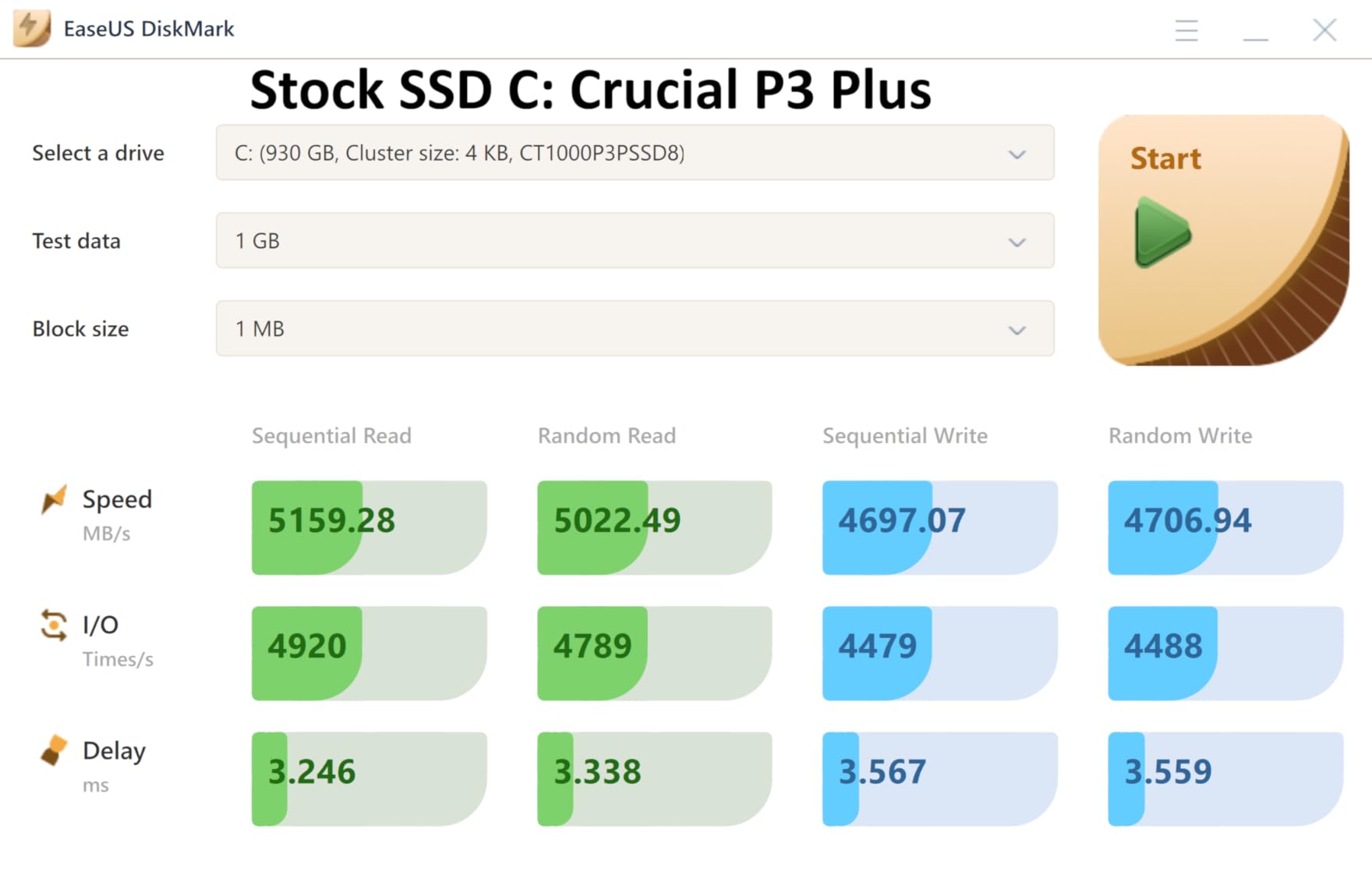
At 7,100 MB/s read and 6,000 MB/s write it is roughly twice the speed of the Gen3 generation it replaces. Buyers report noticeably faster boot times, application launches and file transfers, and treat it as a cost-effective way to quadruple storage after the original drive filled up.
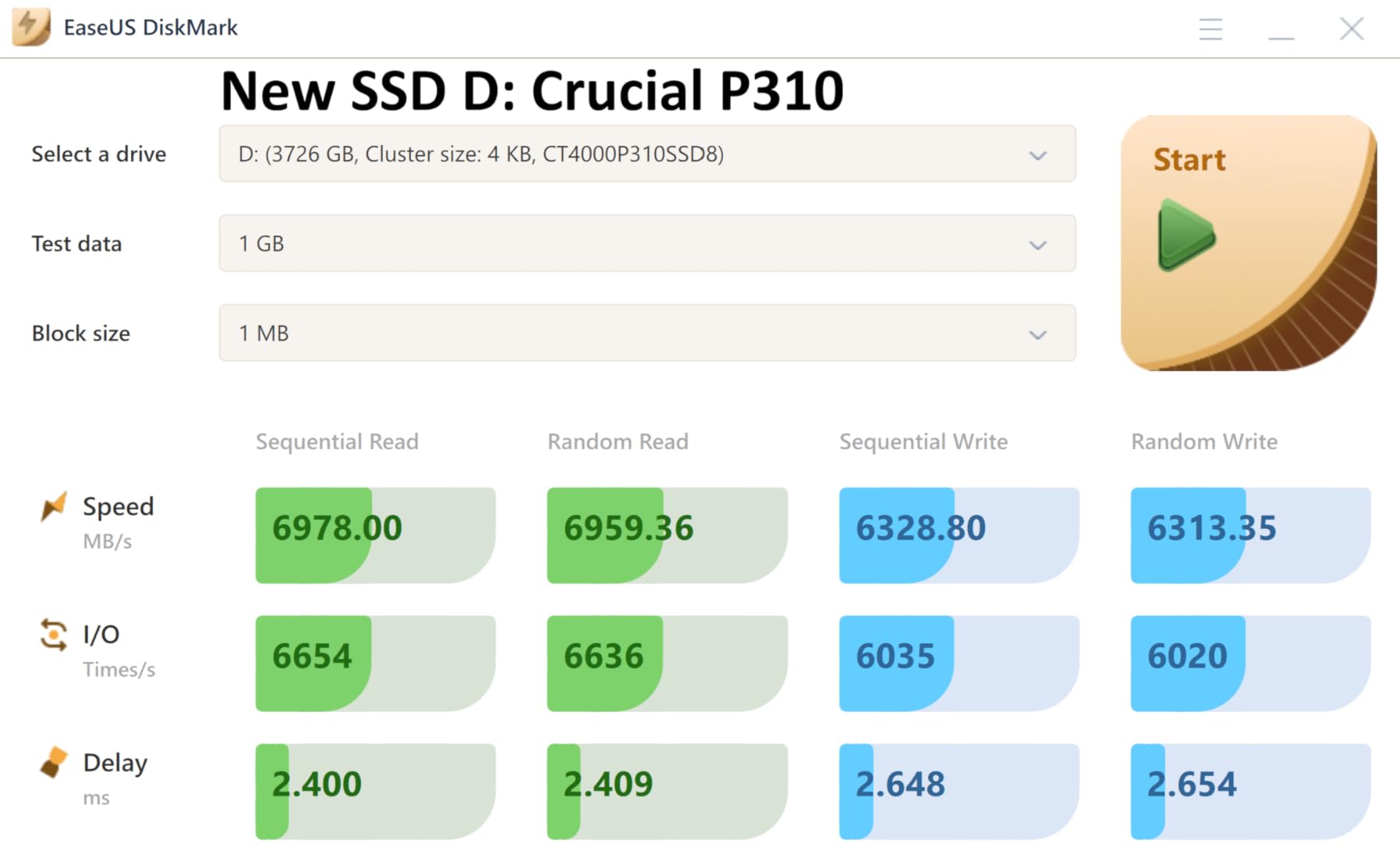
It is built with Micron G8 NAND and thermal control, runs cool under mixed heavy workloads, and does not drain laptop batteries quickly. Acronis data recovery software is included, which is a small but genuinely useful extra.
Crucial explicitly validates it for handheld gaming consoles including the ROG Ally X, Lenovo Legion Go and AYANEO Kun. If you are building a portable PC and want a drive the manufacturer has actually tested, that validation is worth more than a raw spec number.
What to check before you buy
Backward compatibility is real but limited. On a Gen3 system you get about 3,100 MB/s read, which is still a large improvement over SATA, but do not expect Gen4 behaviour.
There is no heatsink. That is not a problem in a laptop or a well-ventilated desktop, but it means an exposed M.2 slot in a hot case can run warm.
Who should skip it
If you are buying a new gaming PC, look at 2TB rather than 1TB. A single 1TB drive is the most common point at which people regret a storage purchase.
It is also one of the slowest of the Gen4 drives listed here on paper. If your old machine already has an NVMe drive, upgrading to this is a lateral move.
9. Corsair MP600 PRO LPX 2TB – Best Low-Profile PS5 Drive
Corsair MP600 PRO LPX 2TB M.2 NVMe PCIe x4 Gen4 SSD – Optimized for PS5 (Up to 7,100MB/sec Sequential Read & 5,800MB/sec Sequential Write Speeds, High-Speed Interface, Compact Form Factor) Black
7100 MB/s read
6800 MB/s write
M.2 with low-profile heatspreader
2TB
PS5 optimized
Pros
- Exceeds Sony PS5 M.2 performance requirements with 6400-6800 MB/s measured
- Pre-installed low-profile aluminium heatspreader prevents throttling
- Low profile fits the PS5 expansion slot cover cleanly
- Installs in minutes and keeps PS4 and PS5 titles playable from the drive
Cons
- PS5 measured speeds fall short of the 7100 MB/s headline figure
- Occasional recognition issues reported by some console owners
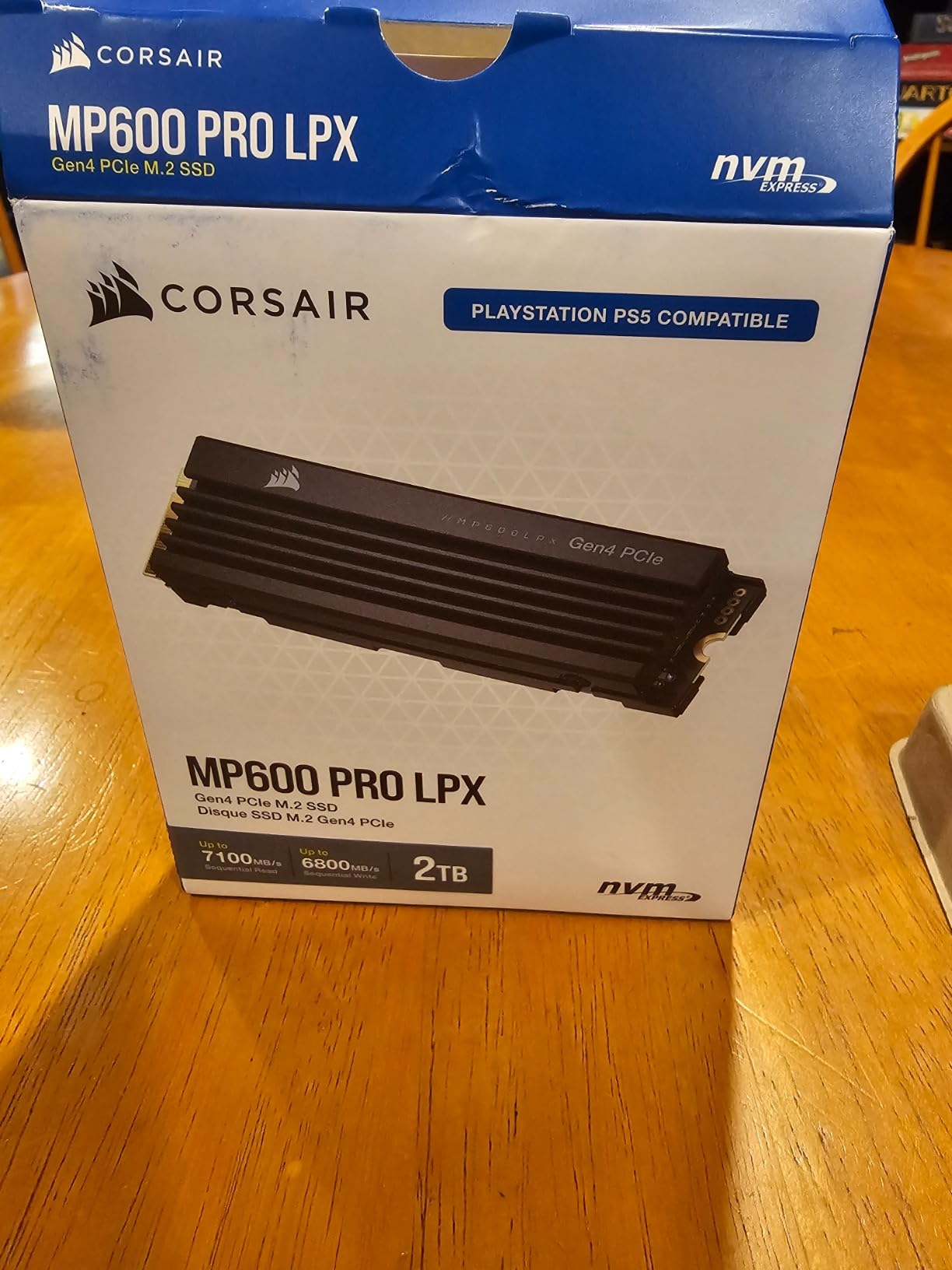
The MP600 PRO LPX exists specifically because of the PS5’s narrow expansion slot cover. The pre-installed low-profile aluminium heatspreader is the reason it fits where taller heatsinks do not, and it does not conflict with other components inside the bay.
On paper it is rated at 7,100 MB/s read and 6,800 MB/s write over a PCIe Gen4 x4 M.2 NVMe 1.4 interface. In the console, owners measure roughly 6,400 to 6,800 MB/s, which still clears Sony’s requirements comfortably.
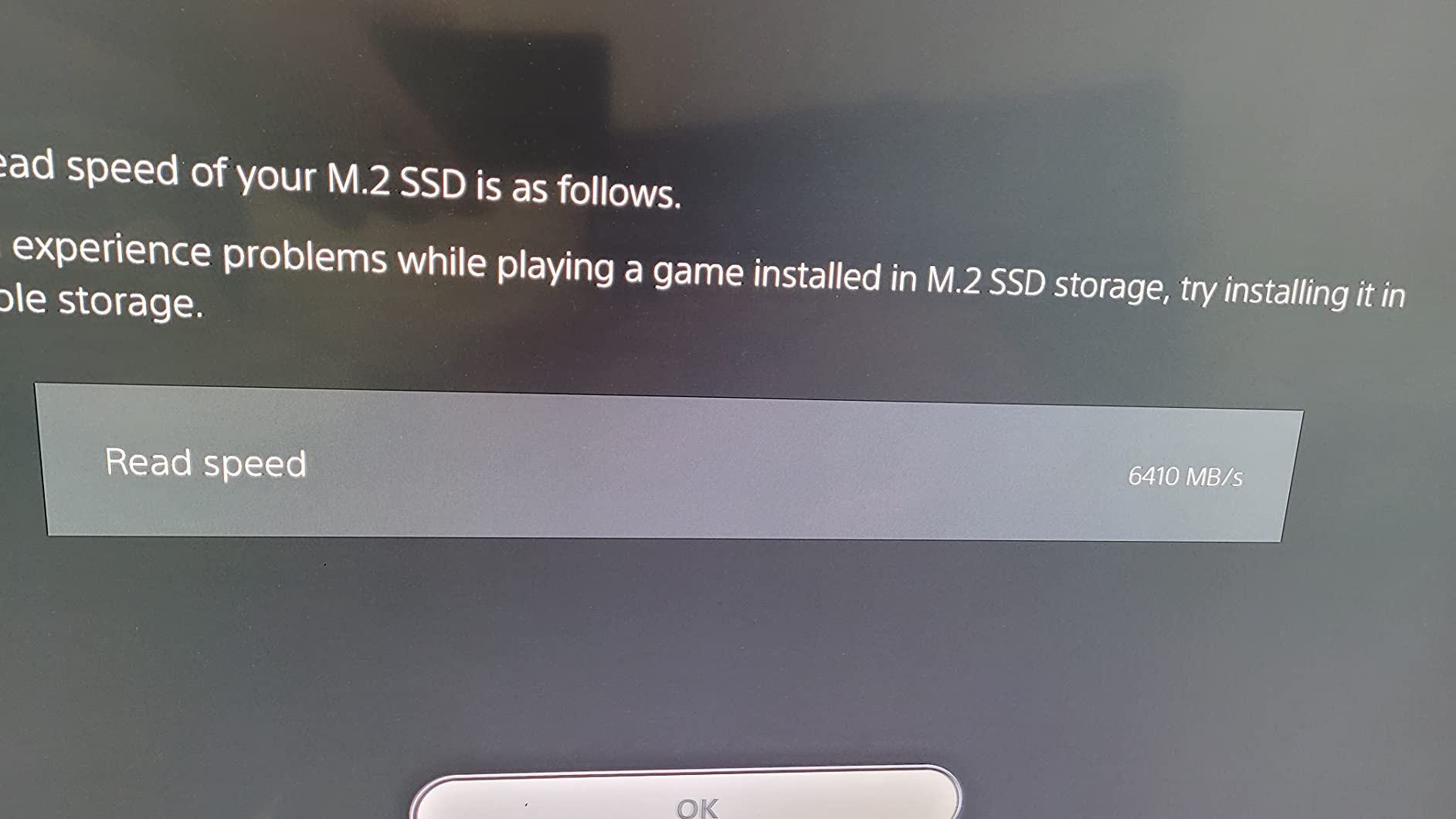
At 2TB it holds a serious PS4 and PS5 library without constant copying, and reviewers describe fast drive-to-drive copying with no data corruption and no heat or connectivity issues over years of use.
The main complaint is purely about expectations. Buyers see 7,100 MB/s on the box, measure something lower in the console, and assume something is wrong. Nothing is wrong, and knowing that in advance saves the frustration.
What to check before you buy
Capacities run from 500GB to 4TB for console libraries. Pick based on how many large games you actually want resident rather than the largest option available.
Verify the console firmware is current before you install. A small number of buyers report the drive occasionally not being recognised by the console initially, an issue Corsair eventually resolved through replacement units.
Who should skip it
If you want zero ambiguity on a console, the officially licensed WD_BLACK SN850P removes the recognition question entirely. That peace of mind has real value when your console is the only gaming machine in the house.
Desktop builders should note the heatsink adds height, which is awkward in tight builds where clearance under a large graphics card is already marginal.
10. Seagate FireCuda 530 1TB – Best for Sustained Heavy Loads
Seagate FireCuda 530 1TB Solid State Drive – M.2 PCIe Gen4 ×4 NVMe 1.4, PS5 Internal SSD, speeds up to 7300MB/s, 3D TLC NAND, 1275 TBW, 1.8M MTBF, Heatsink, Rescue Services (ZP1000GM3A023)
7300 MB/s read
6000 MB/s write
3D TLC NAND
1275 TBW
1.8M MTBF
EKWB heatsink
Pros
- Full PCIe Gen4 bandwidth at up to 7300 MB/s read
- Custom low-profile heatsink co-designed with EKWB reduces throttling
- 1275 TBW endurance and 1.8M MTBF ratings
- Three years of Rescue Data Recovery Services included
Cons
- Heatsink-equipped design adds height that conflicts with tight laptop and console slots
- Premium positioning rather than a value pick
The FireCuda 530 is the endurance pick. With a 1,275 TBW endurance rating and 1.8M MTBF, it is specced for workloads that write far more than a game library ever will, and the 3D TLC NAND behind it is the right type for sustained behaviour.
Speed is 7,300 MB/s read and 6,000 MB/s write, roughly twice a Gen3 M.2 drive and twelve times a SATA SSD. That is more than a gamer needs on paper, which is exactly why this one is interesting: it is aimed at people who game and also produce.
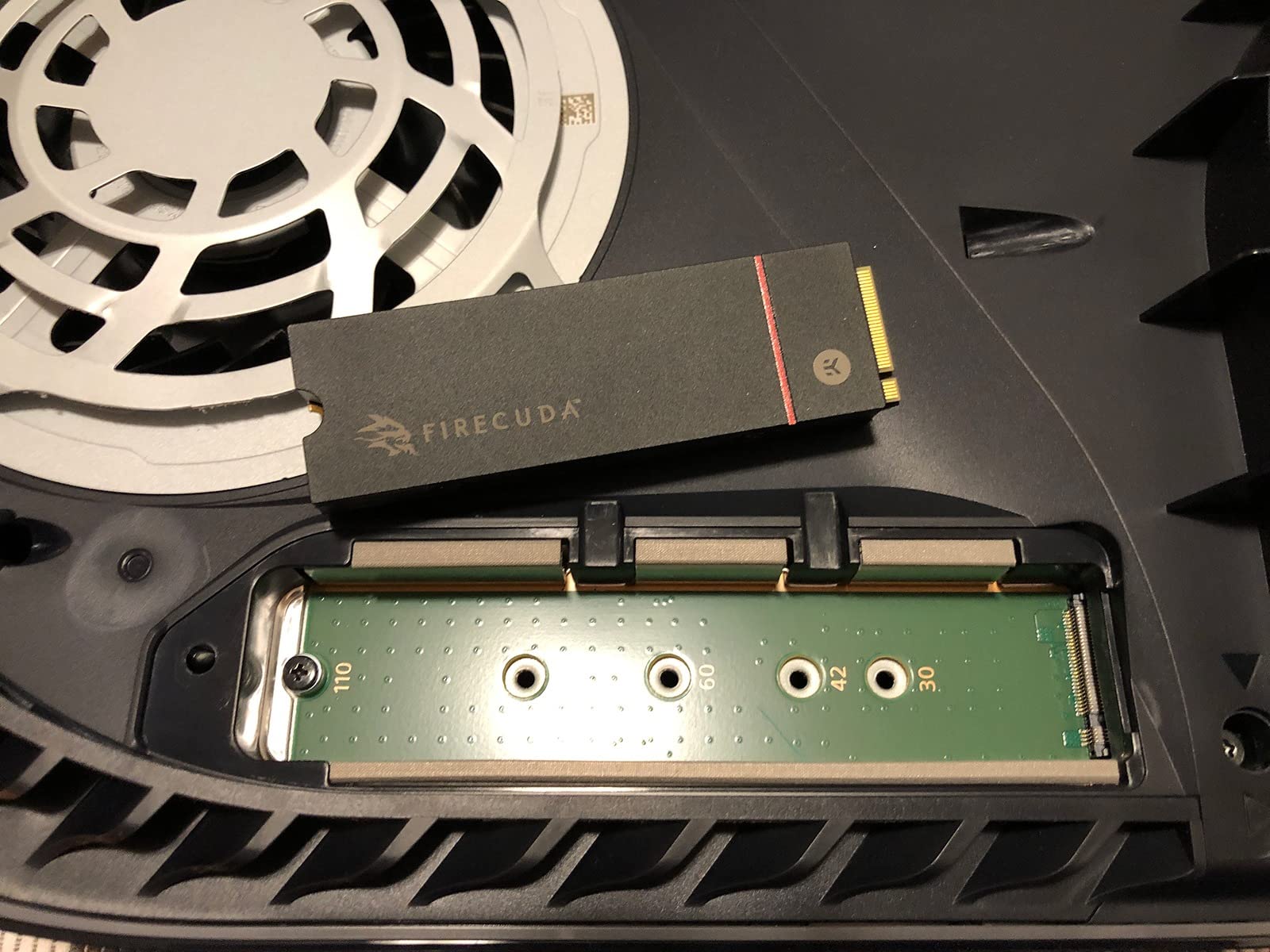
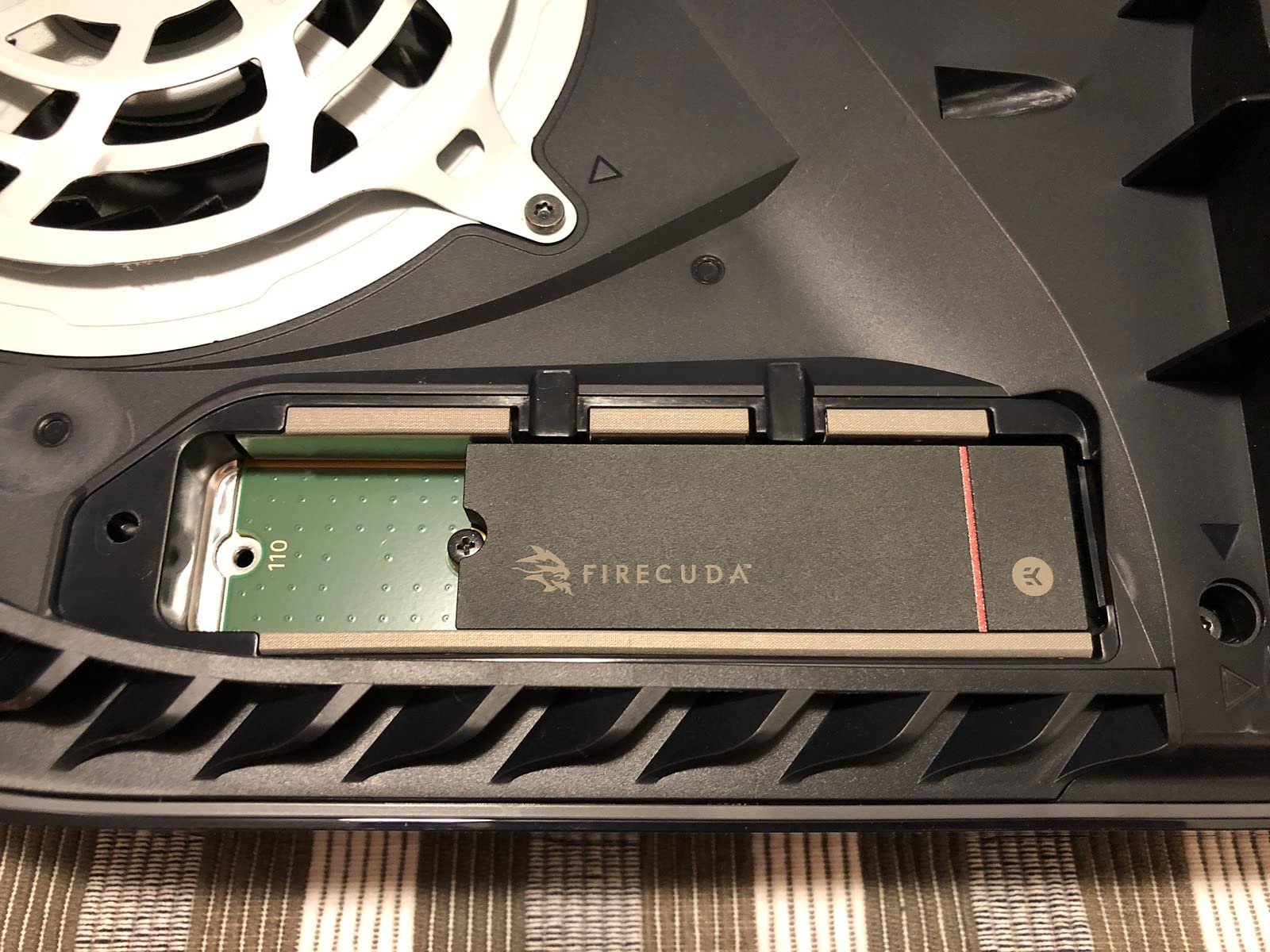
The custom low-profile heatsink was co-designed with EKWB specifically to hold back thermal throttling through long sessions. Owners single out the included heatsink for keeping temperatures in check, and the drive sustains peak performance for longer than bare Gen4 alternatives.
Three years of Rescue Data Recovery Services come with it alongside the five-year limited warranty. For a drive you might fill with captured gameplay and project footage, that pairing is a reasonable form of insurance.
What to check before you buy
Measure your clearance. The heatsink-equipped design adds height, and it can conflict with tight laptop bays and console M.2 slots. In a desktop with a full-size motherboard it is not an issue.
Decide whether the endurance is something you will use. If you only install and play games, a 1,275 TBW rating is generous headroom you are paying for and never drawing on.
Who should skip it
Pure gamers who never write large files should skip the premium and take the capacity instead. The same money buys a much larger Gen4 drive, which solves a problem gamers actually have.
Console owners face the same clearance caution as the Corsair LPX, and the officially licensed Sony drive is the safer console purchase.
11. Predator GM7000 2TB – Best With a Real DRAM Buffer
Predator M.2 SSD 2TB GM7000 with DRAM cache NVMe 1.4 2280 PCIe Gen4×4 Ultra high speed (maximum read: 7400MB/s, max write: 6700MB/s) 3D NAND TLC Internal SSD Compatible with PS5 Pro – BL.9BWWR.106
7400 MB/s read
6700 MB/s write
2GB onboard DRAM
1300 TBW
9 g
5 year warranty
Pros
- Hits 7400 MB/s read and 6700 MB/s write on PCIe Gen4 x4
- Onboard 2GB DRAM cache keeps sustained performance stable
- Customised heat spreader lowers sustained-use temperatures
- Integrated PMU improves efficiency so the gaming PC runs cooler
Cons
- Bundled management software is less refined than Samsung Magician or WD Dashboard
- Biwin-manufactured so support depth varies by region
Most of the value drives in this roundup are DRAM-less. The GM7000 is not, with 2GB of onboard cache at 2TB, and that is the reason to shortlist it if you write to your game drive more than a typical player does.
It reaches 7,400 MB/s read and 6,700 MB/s write on the PCIe Gen4 x4 interface, which sits at the top of the Gen4 range alongside the 990 PRO and the T500.
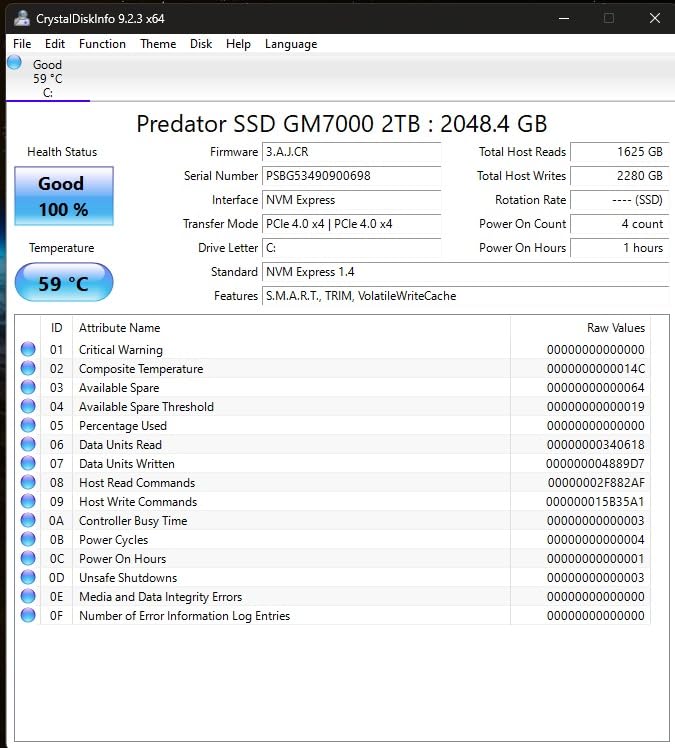
The customised heat spreader lowers operating temperatures during sustained heavy use, and the integrated power management unit in the controller improves efficiency so the rest of the gaming PC runs cooler around it. That is a quieter machine and a cooler CPU-adjacent intake.
Endurance is 1,300 TBW across a five-year limited warranty, and it is listed as compatible with the PS5 and PS5 Pro. Owners treat it as a strong spec-per-dollar Gen4 drive, which is a fair summary.
What to check before you buy
Brand support depth. This is a Biwin-manufactured drive sold under the Predator name, and forum discussion about lesser-known brands is mostly about exactly this: how readily you get a replacement when something goes wrong.
Buy from a retailer with a straightforward return policy. That single decision covers most of what brand familiarity would have covered for you.
Who should skip it
The bundled Biwin Intelligence management software is less refined than Samsung Magician or WD Dashboard. If monitoring firmware and drive health matters to you, budget for a third-party tool.
Read-only gamers will not feel the DRAM buffer. In that case the DRAM-less NV3 or SN7100 give you a similar gaming experience for less.
12. Lexar NM790 2TB – Best Cool-Running 2TB Drive
Lexar 2TB NM790 NVMe SSD w/Heatsink, 7400/6500 MB/s, M.2 2280, PCIe Gen 4×4
7400 MB/s read
6500 MB/s write
Integrated heatsink
1500 TBW
5 year warranty
Pros
- Flagship Gen4 speeds at 7400 MB/s read and 6500 MB/s write
- Integrated heatsink keeps temperatures well within limits
- Up to 40% lower power draw than DRAM-cache Gen4 drives with HMB 3.0
- Holds roughly 50 games on a PS5 with much shorter load times
Cons
- DRAM-less so slightly slower in some cache-heavy scenarios
- Integrated heatsink limits compatibility with some external enclosures
The NM790 is the one to look at if your PC or console case runs hot and you refuse to add cooling. The integrated heatsink keeps temperatures well within optimal limits under sustained load, and the drive itself draws up to 40% less power than DRAM-cache-enabled Gen4 SSDs thanks to HMB 3.0.
It still delivers flagship Gen4 numbers at 7,400 MB/s read and 6,500 MB/s write, so the efficiency is not being bought with a performance cut. That combination of cool running and low draw also makes it a good fit for a compact build.
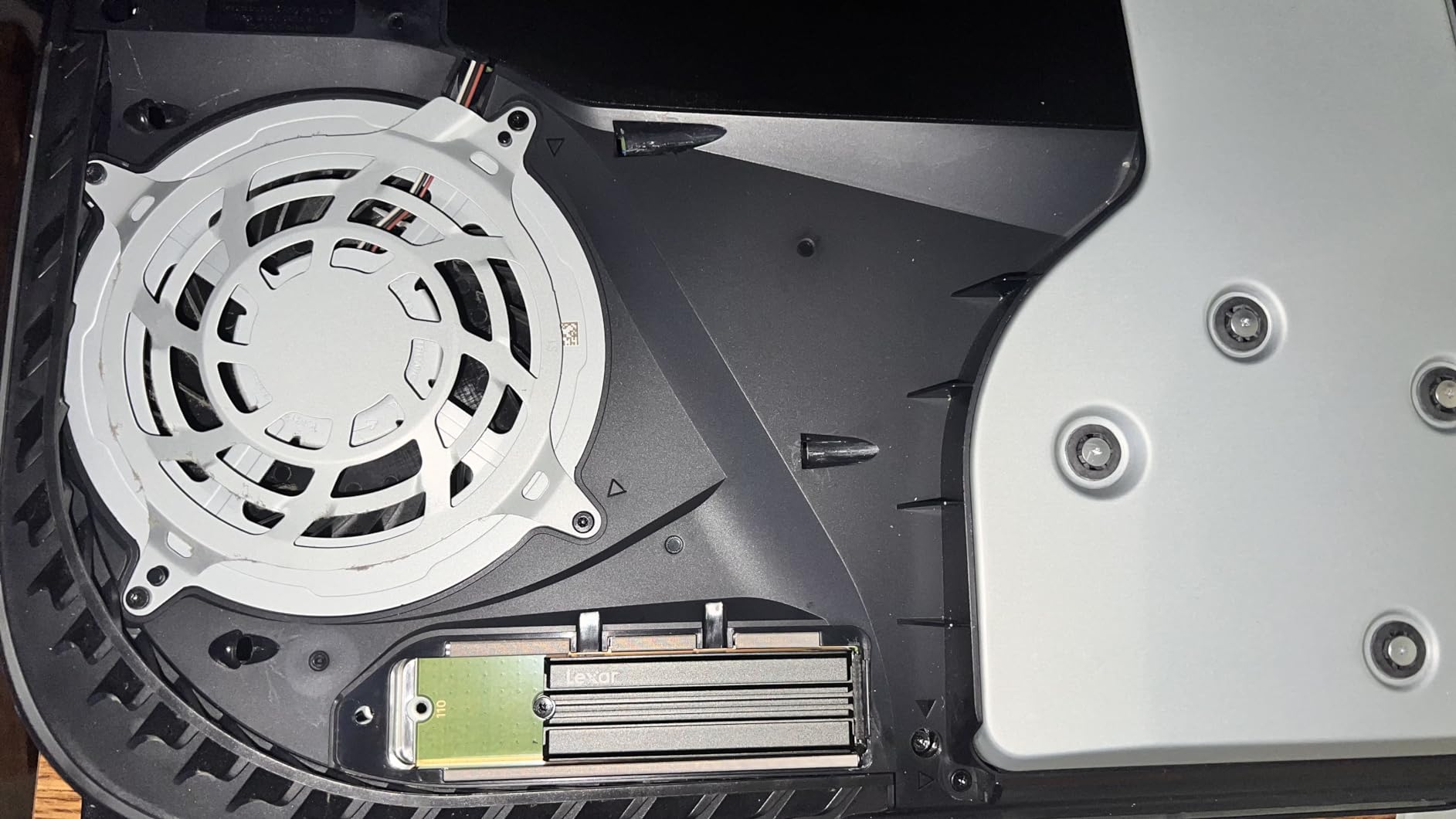
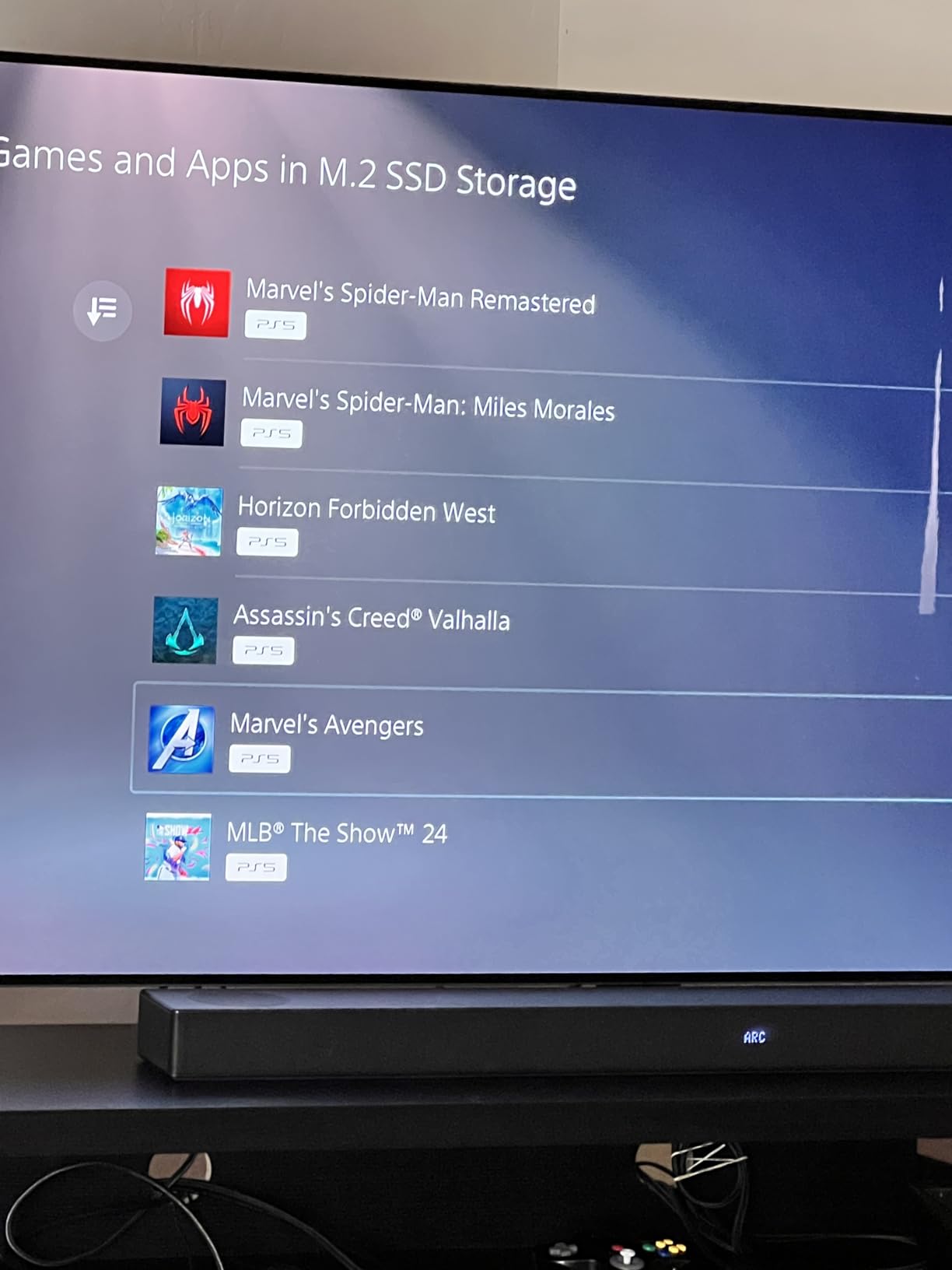
On a PS5 it holds roughly 50 games and cuts load times dramatically against onboard console storage, and owners recommend it widely as a cost-effective upgrade for both consoles and PCs. Several reviewers also cite it as outstanding value in 24/7 NAS and UnRAID cache duty.
Endurance is a strong 1,500 TBW across a five-year limited warranty, which is one of the higher figures attached to a DRAM-less 2TB part at this capacity.
What to check before you buy
The integrated heatsink limits compatibility with some portable external enclosures. If your plan involves moving the drive in and out of a USB housing, buy the non-heatsink version instead.
Being DRAM-less, it is a little slower than a cache-equipped drive in some scenarios. For a game library that is mostly read, the gap rarely shows up.
Who should skip it
If your case already has airflow and your motherboard has an M.2 heat spreader, the integrated heatsink buys you little and costs you enclosure compatibility.
It also carries the smallest review base in this roundup. The rating is excellent, but fewer owners means less long-term history to lean on when deciding between two similar drives.
Does an NVMe SSD Increase FPS?
No. A faster SSD does not raise your average frame rate, and any article that tells you otherwise is selling you something. Storage is not what limits your frame rate in a modern gaming PC, and your GPU is.
What it does affect is time spent not playing. Load screens get shorter, asset-heavy games stop hitching when they pull textures mid-session, and DirectStorage titles stream assets to the GPU more directly. On a drive that reports zero asset-streaming load times, you are looking at a smoother experience rather than a faster one.
That distinction is why buyers upgrading from a SATA SSD report a genuine, noticeable improvement, while buyers upgrading from a decent Gen4 NVMe drive report little to no change. Same hardware, same settings, different point of departure.
How to Choose the Best NVMe SSD for Gaming
PCIe 4.0 or PCIe 5.0 for gaming
Buy PCIe 4.0. That is the short version, and it holds even against the 9100 PRO sitting above in this list.
A PCIe 4.0 x4 drive is close to saturated at 7,400 MB/s, and game engines do not yet pull assets fast enough to use twice that. The Gen5 premium buys you headroom for AI workloads and video editing, not for gaming. Forum consensus is blunt on this: Gen5 SSDs are not yet worth the premium for gaming specifically.
Two exceptions are worth making. If your platform ships with a Gen5 slot and you are buying a large-capacity flagship anyway, the price gap narrows. And if you are building a new machine that will still be running in five years, a little extra bandwidth now is cheap insurance.
How much storage you need
Buy 2TB if you can. One terabyte is the number most people regret.
A current Windows 11 install runs 80GB to 150GB depending on updates. AAA titles regularly land between 80GB and 150GB, and several popular releases have grown well past that. Add shader compilation files, Discord, and a capture library, and a 1TB drive gives you far less playable space than the number suggests.
One terabyte is right if you own a handful of games and delete aggressively. Four terabytes is not overkill for gaming if you have a large library plus a 150GB OS install, but most people reach 2TB and stop rather than pushing on to 4TB.
The setup most enthusiasts actually run is two drives: a smaller fast boot drive for Windows and the handful of games you play daily, and a large secondary library drive for everything else. Both of those drives appear in this roundup, and splitting them also means a reinstall never costs you your entire game library.
DRAM-less or DRAM cache
For gaming, DRAM-less is fine. Forum consensus is close to unanimous on this, and the reasoning is straightforward: gaming reads far more than it writes, so a host memory buffer covers the shortfalls that matter least.
DRAM cache earns its place on drives that see sustained heavy writing, which is why it shows up on the Predator GM7000 and the WD_BLACK SN850X. If your workload is installing games and playing them, the difference will not be measurable.
TLC or QLC NAND
Choose TLC. QLC writes more slowly, has lower endurance, and is where most of the cost cutting in budget drives happens.
The SN7100 is a good example of a genuinely good budget choice that keeps TLC 3D NAND at up to 2,400 TBW rather than dropping to QLC for a headline number. When a spec sheet omits the NAND type entirely, assume the cheapest option and check reviews.
Do you need a heatsink
Usually no, in a desktop tower with airflow. Most motherboards ship with an M.2 heat spreader already fitted and it is enough for Gen4 drives running under 60C.
You do need one in three situations: a Gen5 drive like the 9100 PRO, a console install, or a compact case where the drive sits under a long graphics card. The FireCuda 530 and Corsair MP600 PRO LPX both include heatsinks, and the Corsair one is built specifically to clear the PS5 expansion bay cover.
The hardware lottery and silent component swaps
What is printed on the box is not always an accurate description of what is inside it. This is the single biggest reason people hesitate on lesser-known brands.
Manufacturers change NAND suppliers and controllers within the same model number. A reviewer reporting great results may have tested a different batch to the one you receive. Forum members put it plainly: reliability is repeatedly ranked above price when people are asked what matters most.
You cannot fully control this, but you can reduce your exposure. Buy from a retailer with an easy return policy. Prefer drives that publish endurance figures and a five-year warranty. Check whether the listing states the NAND type. And read the reviews of the specific model rather than assuming the brand name tells you what is inside.
NVMe, SATA or a hard drive
NVMe, and it is not a close call. NVMe runs commands directly between the CPU and the flash memory over PCIe lanes, which is why these drives reach 7,000 MB/s and far higher random read speeds than the 550 MB/s ceiling of SATA.
Any PC gamer on a SATA SSD or a hard drive feels the change immediately. Game load times, boot times, and asset stutter all improve. If you are still on a spinning drive in 2026, that is the upgrade that actually changes how your machine feels.
Related reading: our picks for the best external SSDs if you want console and handheld storage without opening a case, and the best portable external SSDs for moving a library between machines.
Console, Handheld and Laptop Upgrades
PlayStation 5
The PS5 accepts M.2 2280 NVMe drives that clear its performance requirements, and the two console picks in this list both exceed them. The WD_BLACK SN850P is officially licensed with a console-shaped low-profile heatsink. The Corsair MP600 PRO LPX has a pre-installed heatspreader designed for the same narrow bay.
Buy the licensed drive if you want zero ambiguity. Buy the Corsair if you want more capacity per purchase. Both let you run games directly from the expansion bay rather than constantly copying to and from the console.
Xbox Series X and S
The Xbox takes a different approach and its storage expansion is proprietary rather than a standard M.2 slot you can fill yourself. That rules out most of the drives in this roundup for that console, including the WD_Black SN7100 despite its compatibility note.
Check the current storage options for your specific model before buying anything, since the supported expansion hardware changes over time.
Steam Deck and other handhelds
Handhelds are where thermals and power draw dominate, and that is exactly where the WD_Black SN7100 and the Crucial P310 pull ahead. The P310 is explicitly validated for the ROG Ally X, Lenovo Legion Go and AYANEO Kun. The SN7100 draws less power than a Gen3 Samsung and stays cool with no heatsink.
Form factor is the thing to check first. Many handhelds take an M.2 2230 drive in a short slot rather than a full 2280, and a 2280 drive simply will not fit. Confirm the slot length and the maximum thickness your handheld allows before buying anything with a heatsink.
For laptop shoppers more broadly, our best gaming laptops guide covers the machines these drives go into.
Frequently Asked Questions
Are NVMe SSDs good for gaming?
Yes, and the upgrade matters most if you are moving from a hard drive or a SATA SSD. An NVMe drive talks to the CPU over PCIe lanes rather than the slower AHCI protocol, so game load times, boot times and asset streaming all improve noticeably. If you already own a decent PCIe 4.0 drive, moving to another Gen4 drive will not feel different.
Which NVMe SSD is best for gaming?
The WD_BLACK SN850X 1TB is the best all-rounder, rated at 7,300 MB/s sequential read and 6,300 MB/s write over PCIe 4.0 x4, with an onboard DRAM cache and a single-sided board that fits tight laptop and console slots. For the fastest Gen4 option on paper, the Samsung 990 PRO reaches 7,450 MB/s read.
Should I get 1TB or 2TB SSD for gaming?
Buy 2TB if you can. Windows 11 alone can occupy 80GB to 150GB after updates, and many AAA titles install at 80GB to 150GB or more. One terabyte works fine if you own a handful of games and delete regularly, but it is the most common point at which people regret a storage purchase.
Is 4TB SSD overkill for gaming?
Not if you have a large library. Four terabytes is plenty for Windows plus dozens of large titles and is sensible for anyone who keeps finished games installed. It only becomes wasted space if you are still deleting games regularly, in which case 2TB is the better buy.
Which NVMe SSD is fastest?
The Samsung 9100 PRO is the fastest, reaching 14,700 MB/s sequential read and 13,400 MB/s write over PCIe 5.0 x4, with random performance up to 1,850K read and 2,600K write IOPS. It needs a PCIe 5.0 host slot and runs hotter than Gen4 drives, and gamers on Gen4 hardware gain nothing from the extra bandwidth.
What is the average lifespan of a NVMe SSD?
It depends far more on how much you write than on how long you own it, which is why endurance ratings like TBW matter more than warranty length. The drives here range from 1,275 TBW on the Seagate FireCuda 530 up to 2,400 TBW on the WD_Black SN7100. A five-year warranty is common across the category, and checkers built into drive management software will report health as the cells wear.
Final Word
After working through twelve drives, the WD_BLACK SN850X 1TB remains the best NVMe SSD for gaming overall. It holds around 6,500 MB/s read under sustained load, it has an onboard DRAM cache, it is single-sided so it fits where many others do not, and it has the deepest owner history in this group at a 4.8 rating across more than 17,000 reviews.
Pick the Samsung 990 PRO if you want the fastest Gen4 silicon and the strongest software tooling. Pick the Crucial T500 at 2TB if you would rather have the room than the last 50 MB/s. Pick the Kingston NV3 if budget is the deciding factor and you are moving off SATA.
And if you are on a PCIe 5.0 board already, the Samsung 9100 PRO is there. Just buy the capacity first and the bandwidth second. Whatever you choose, check the drive you take delivery of against the review you trusted, because that is the one part of this purchase you do not fully control.
Happy building, and may your load screens be short.
More from Pwice: compare the best gaming monitors once your storage is sorted.